
Field Force Automation Software for Field Teams
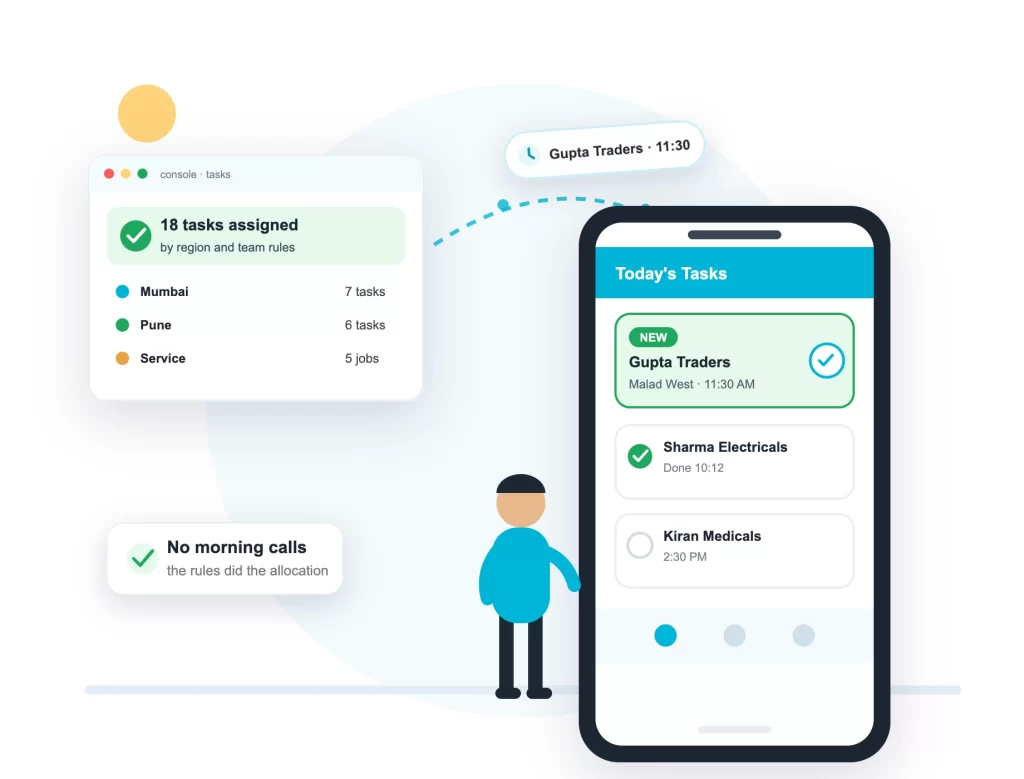
Tasks arrive from your CRM, a bulk upload or the console, and rules assign them to the right people on their own: by region, by department, by team. Nobody sits and allocates the day every morning, and nothing gets missed.
Starting from Rs 65 per user per month. Android, iOS and any browser.
Our Clients




What Is Field Force Automation?
Field force automation means the routine work of running a field team happens without a person doing it. Tasks get assigned by rules instead of by phone calls. Attendance is marked by the Login punch. Site arrivals get logged by geofences. Reports are built from what was punched in the field, with nothing typed at night.
Some companies call it a field force automation system, others a field force automation tool. The name matters less than the result: the morning allocation, the evening report and everything between them stop being manual work.
What a Field Force Automation Solution Takes Over
Task Allocation
Tasks route to the right team by region, department and user group rules. A Mumbai task reaches the Mumbai team without anyone touching it.
Attendance
The morning Login punch marks attendance and starts GPS. No separate attendance step, no register.
Site Logs
Geofences record arrival and departure at every office, site and client location on their own.
Distance and TA
Kilometres are recorded through the day, so travel allowance comes from real distance, no claim forms.
Day Reports
Visits, hours, orders and photos land in the report as they happen. By evening it is already complete.
System to System
Your CRM or ERP pushes tasks in over the API, and pulls attendance and visit records back out.
Rules That Match How Your Company Runs
Automation has to match how your company is organised. The rules follow your structure:
- Region-wise: each state or zone gets its own tasks and teams
- Department-wise: sales, service and collection stay separate
- Team-wise: each supervisor sees only their own people
- User group rules decide which team a task belongs to
- Rules are set up for your account and can change as you grow
Straight Into the Field App
An assigned task does not sit in a report. It opens in the Field Task Manager app on the employee’s phone, in appointment order, with the client’s location, number and form attached.
Everything the automation records flows into the same reports as the rest of the platform. Dashboards, teams and hierarchy are covered on the field workforce management page.
Connects to the Systems You Already Use
Tasks and customer details can come straight from the CRM or ERP your company already runs, over REST APIs and webhooks, in real time. No developer handy? Bulk upload does the same job from a spreadsheet. And the records flow back the same way: your systems can fetch attendance, visits and distance over a web service call.
Field Force Automation FAQs
What is field force automation (FFA)?
Field force automation is software that does the routine work of running a field team by itself: assigning tasks by rules, marking attendance from the Login punch, logging site arrivals with geofences and building day reports from real punches. People shorten it to FFA, as in an FFA app or FFA software.
How is this different from field force management?
Field force automation is the self-running part of a field force management system. Management covers everything: teams, tracking, reports and dashboards. Automation is the piece that removes manual work, starting with task allocation. In ConnectMyWorld they are the same product.
Is this the same as sales force automation (SFA)?
They are similar, with one difference. Sales force automation software is built around selling: beats, orders and targets, and an SFA application usually serves FMCG and pharma sales teams. Field force automation covers any field team: service engineers, verification agents, collection teams, delivery staff and sales teams too.
What exactly can be automated?
Task allocation by region, department and user group. Attendance from the Login punch. Site arrival and departure logs from geofences. Distance recording for TA. Day reports built from punches. And two-way data flow with your CRM or ERP over the API.
Does it work with our CRM or ERP?
Yes. Your system pushes tasks and customer details in over REST APIs and webhooks, in real time, and fetches attendance and visit records back over a web service call. If you do not want to touch the API, bulk upload from a spreadsheet does the same job.
What are the benefits of field force automation?
Managers stop spending the first hour of every day allocating work. Tasks stop getting missed, because assignment runs the same way every time. TA is paid on recorded kilometres. And the evening report is ready without anyone typing, so decisions happen the same day.
What does field force automation software cost?
Plans start from Rs 65 per user per month, with a free 2-week trial. Allocation rules are configured for your account: tell us how your regions and teams are structured, and our team helps you set it up.
Stop Allocating the Day by Hand
Start the free 2-week trial, tell us how your regions and teams are set up, and tomorrow’s tasks will reach the right phones automatically.