
Field Task Manager: One App for the Whole Field Day
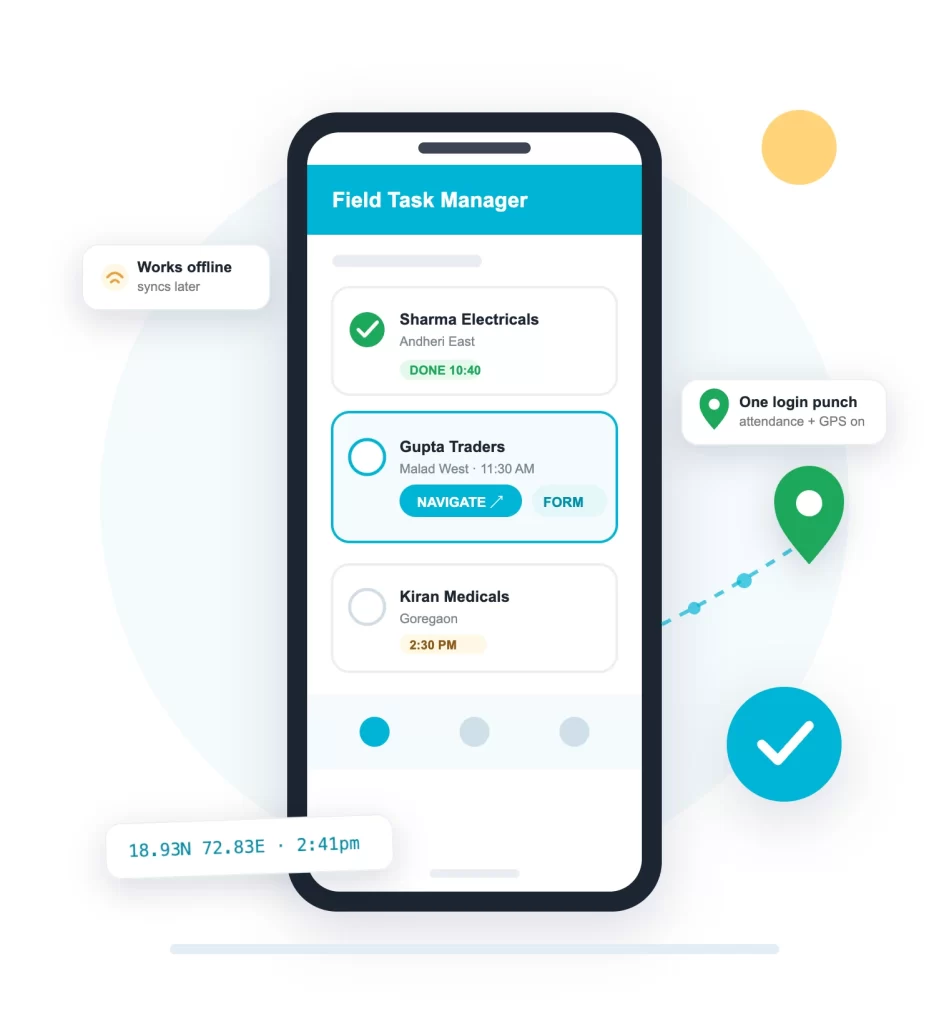
Field Task Manager (FTM) is the app your field staff carry: the day’s tasks in order, navigation to the client, forms and photos at the visit, and attendance from the login punch itself. It works offline and syncs on its own.
Android and iOS. Staff use their own phones, nothing else to buy.
Our Clients



What Field Task Manager Does
Most task apps are made for office to-do lists. Field Task Manager is made for people who work outside: every part of a field day, from the morning login to the evening report, runs in this one app.
- The day's tasks in appointment order, with client details attached
- Login punch marks attendance and starts GPS tracking
- Turn-by-turn navigation to every client location
- Forms filled at the visit, by dropdowns or voice
- Live photos only, with GPS location and time on each
- Works with no network, everything syncs later
- Distance recorded all day, so TA is paid on real kilometres
- Check in and check out of client meetings with proof
- Tasks can be transferred when plans change
- Staff see their own attendance and movement reports
Field Task Management, Start to Finish
Field task management is a loop, not a list. Tasks are created in the browser console, uploaded in bulk, or pushed from your own system by API, and auto-assigned by your rules. Each task lands on the right phone with the address, contact and appointment time. The visit comes back with check-in, photos and a filled form, and the evening report builds itself. The field workforce management page shows the manager’s side of the same loop.
Assign any way you like
One at a time, bulk upload, or straight from your CRM or ERP through the API.
Every task carries the place
Client coordinates, contact number and appointment time travel with the task.
The report writes itself
Task status, forms and photos flow into reports you can download in Excel, CSV or PDF.
Field Task Manager and FTM Supervisor
Field staff carry Field Task Manager. Managers watch the day on the FTM Supervisor app or in any browser: live map, task board and reports, wherever they are.
Field Task Manager
For field staff. Tasks, attendance, navigation, forms and photos. On Google Play and the App Store.
FTM Supervisor
For managers. Live team map, task assignment and reports on the phone. On Google Play and the App Store.
Browser console
The full dashboard for admins: bulk uploads, geofences, form builder and every report, from any browser. Nothing to install.
Live in Days, Not Months
Install the app from the store, create your account, and set up tasks, geofences and forms yourself from the browser console. Staff use their own phones, and there is nothing to install on a server.
The App Behind Every ConnectMyWorld Page
Field Task Manager is the app at the centre of the whole platform: field task management, GPS tracking, attendance and offline data collection are all views of the same field day.
Field Task Manager: Frequently Asked Questions
What is Field Task Manager?
Field Task Manager (FTM) is ConnectMyWorld's app for field staff. It puts the day's tasks on the phone with navigation, forms and photo proof, and the login punch itself marks attendance and starts GPS tracking. It runs on Android and iOS.
Is Field Task Manager the same as ConnectMyWorld?
Yes. ConnectMyWorld is the platform and the company; Field Task Manager is the app your field staff use, and FTM Supervisor is the app for managers. One account runs all of them.
Is Field Task Manager free?
There is a free 2-week trial with every feature on, no card needed. After the trial, plans are priced by team size, and the rate comes down as your team grows. The pricing page shows every slab.
How do I download the Field Task Manager app?
From Google Play or the Apple App Store. Managers install FTM Supervisor. Start the trial first so your team has an account to log into.
Does it work on iPhone?
Yes. Both Field Task Manager and FTM Supervisor run on iOS and Android. Most field tracking apps in India are Android only, so mixed teams are covered here.
Does it work without internet?
Yes, it is offline by design. Tasks, attendance, forms and photos all work with no network, and location tracking continues. Everything syncs on its own when the connection returns. Nothing is lost, we call it zero data loss.
Do we need special phones or hardware?
No. Staff use their own Android phones or iPhones, managers use the FTM Supervisor app or a browser, and there is no new hardware to buy. The app is light and runs fine on ordinary phones.
Put It on One Team's Phones This Week
Start the free 2-week trial, install the app from the store, and judge it on a real week of field work.